
The Audio Eraser feature on Galaxy devices is designed to minimize unwanted noise in videos while enhancing the sounds you wish to hear, offering a more immersive viewing experience. Initially launched for editing saved content on the Galaxy S25 series, this feature has undergone significant improvements over the years. Audio Eraser was expanded to include playback adjustments within native apps like Gallery and Voice Recorder on the Galaxy Z Fold7 and Z Flip7.
Now, with the introduction of the Galaxy S26 series, Audio Eraser has further advanced to support real-time audio control for content streamed across various platforms. This article explores these advancements in greater detail.
From Fix It Later To Filter It Now
With the Galaxy S26 series, Audio Eraser has transformed into a live audio tool. It facilitates real-time sound separation and optimization for voices, music, and background noise, not only in recorded content but also in over-the-top (OTT) or social media content you are viewing. This shift marks a transition from post-recording edits to real-time audio management.
By incorporating an AI sound engine with advanced sound separation technology, the Galaxy S26 series allows users to adjust and control sound instantly as it happens. This capability ensures a clear and immersive listening experience across various streaming platforms by effectively neutralizing distracting background noise.
The video below illustrates how the Galaxy S26 series maintains clarity in the sounds you want to hear, even in noisy environments.
▲ Comparison of interview audio before and after using Audio Eraser on the Galaxy S26 series
Seamless Access, Total Control
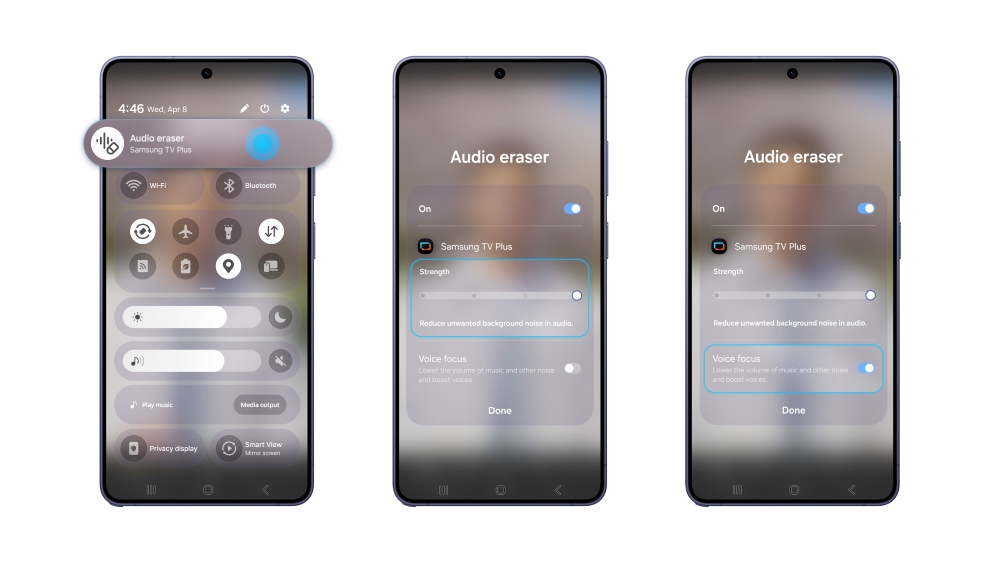
Users can easily adjust noise and reduce distractions directly from the Quick panel without needing to rewind or replay content. While a video is playing, simply swipe down from the top right of the screen and tap the Audio Eraser icon to start filtering the sound immediately.
Once activated, the feature offers advanced controls for a more professional touch. The “Strength” slider allows fine-tuning of noise reduction, and the “Voice Focus” option ensures crystal-clear dialogue in videos.
With the Galaxy S26 series, users can enjoy customized sound quality in real-time, regardless of the content they are watching.
▲ Access Audio Eraser via the Quick panel on the Galaxy S26 series, with controls to adjust “Strength” and enable “Voice Focus.”
Audio Eraser now transcends its original noise reduction purpose, enabling users to design their sound in real-time. Experience a more personalized and comfortable listening experience with the Galaxy S26 series.
Audio Eraser supports noise adjustment from media playing through the Quick panel for select apps on the Galaxy S26 series. The level of support varies by model and OS version, and results can differ based on video sound conditions. A Samsung Account login is required. Certain types of sound, such as voices, music, and noise, can be detected, though actual detection may vary depending on the audio source and video conditions. The accuracy of results is not guaranteed. The Galaxy S26 series includes Galaxy S26, S26+, and S26 Ultra. Images are simulated for illustrative purposes, and actual UX/UI may differ.