Following the initial exploration of San Francisco’s diverse scenery using the Galaxy S26 Ultra camera, this second installment focuses on what happens next. The Galaxy S26 Ultra, equipped with advanced AI, edits photos to align with user intentions, transforming them into new forms of content.
Samsung Newsroom delved into how the AI features of the Galaxy S26 Ultra enhance travel experiences, testing these capabilities on-site in San Francisco.
[Photo Assist]
Restore and Refine With a Single Prompt
When traveling, it’s common to start eating before capturing a photo. At a café in San Francisco, a cake had already been partially eaten. However, with the Galaxy S26 Ultra, even such missed opportunities are easily fixed.
By simply typing, “Make it look uneaten,” Photo Assist restored the cake to its original appearance.
▲ Before-and-after comparison of a partially eaten cake edited using Photo Assist
Reimagine Any Scene After the Shot
Capturing the perfect travel shot is challenging, as moments when scenery, subjects, and timing align are rare.
Using Photo Assist, a photo of San Francisco’s streets was merged with an image of a passing tram, creating a seamless effect as if the scene was captured in one moment.
▲ Before-and-after comparison of a street scene combined with a tram using Photo Assist
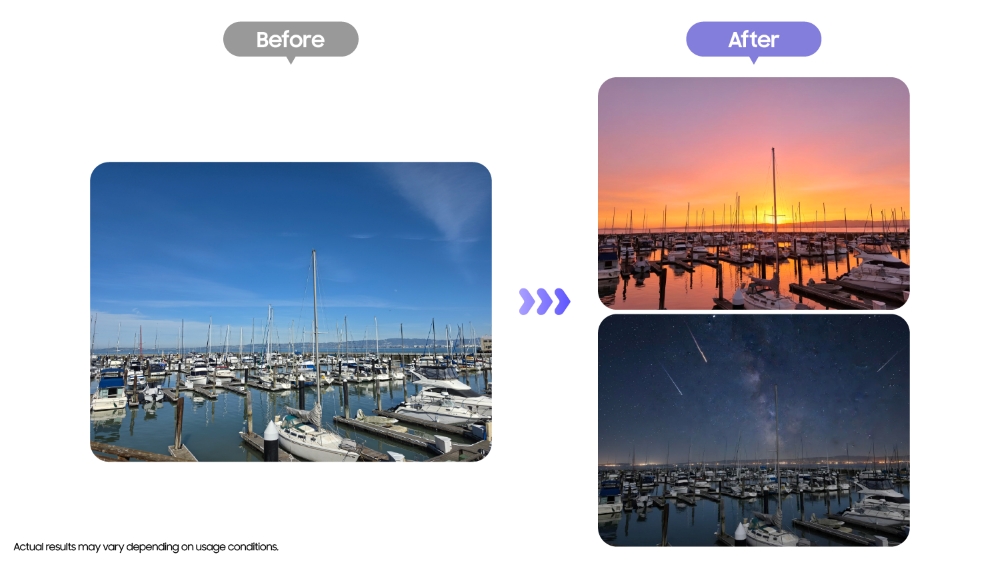
Another remarkable feature is the ability to alter the time of day. By uploading a daytime photo of San Francisco’s harbor and entering prompts like “Make it look like sunset” or “Turn it into a night scene,” Galaxy AI adjusted the sky and lighting, recreating the scene at different times of the day.
▲ Before-and-after comparison of a daytime harbor scene transformed into sunset and nighttime scenes using Photo Assist
[Creative Studio]
Turn Photos Into Artistic Creations
After capturing a scene of sea lions at Pier 39, one of San Francisco’s iconic landmarks, the photo was imported into Creative Studio. By selecting the Oil painting style, Galaxy AI analyzed the image’s texture and colors, transforming it into an oil painting-style image.
▲ Before-and-after comparison of a sea lion scene at Pier 39 rendered in an oil painting style using Creative Studio
The result is reimagined with a different aesthetic, making it feel like an entirely new piece.
Creative Studio on the Galaxy S26 Ultra transforms travel photos into various styles, assisting users in preserving memories through fresh perspectives.
▲ Oil painting-style image of a San Francisco scene generated using Creative Studio
Create Custom Stickers With Ease
Custom stickers were also created using a photo of sea lions. After launching Creative Studio, selecting an image, and choosing a style, tapping “Generate” produced a character sticker that captured the sea lions’ distinctive features.
Users can generate images repeatedly until they achieve the desired result, then choose from seven themes — such as “A slice of Life,” “School days,” or “Today’s vibe” — to save the sticker as a themed set.
▲ Sea lion stickers designed using Creative Studio
These stickers can be used not only to decorate photos but also across text-based apps including messaging and notes.
With Creative Studio, users can transform everyday photos into personalized content, sharing memories in new ways — whether among friends and family or on social media.
Capturing moments in San Francisco with the Galaxy S26 Ultra and enhancing them with Galaxy AI made travel memories richer than ever. From shooting and editing to sharing, the entire process is seamlessly integrated into a single device.