To empower small businesses with AI-driven customer support, Business AI has been launched in India within the WhatsApp Business app. This feature is accessible in all native languages across India and enables eligible businesses to engage with customer queries 24/7, capture leads, schedule appointments, and boost sales without needing additional tools or platforms.
Making Every Customer Conversation Count
Business AI on WhatsApp can be tailored to a business’s specific information, allowing automation of responses to common questions and assisting customers with inquiries about products, pricing, discounts, shipping, and more. Soon, businesses will also be able to process payments directly within WhatsApp chats using UPI. For more complex queries, business owners can take over the conversation from the AI. In the coming weeks, Business AI will be available to all eligible businesses using the WhatsApp Business app.
A Kantar study from 2025 indicates that 91% of online adults in India communicate with a business weekly, highlighting messaging as the preferred method for Indians to connect with businesses, with WhatsApp at the core of this interaction. Business AI on WhatsApp equips small business owners with tools to be accessible, responsive, and competitive at any time.
Ravi Garg, Director of Business Messaging at Meta India, stated, “Small businesses are the backbone of India’s economy, and we deeply understand the value of every customer conversation for them. Over the years, we’ve consistently heard that managing high volumes of customer queries with limited resources remains one of the biggest challenges for small businesses. This is where we believe that AI can be a game-changer for them. With the introduction of Business AI on WhatsApp, we’re now putting that power directly into the hands of small businesses — ensuring they never miss a customer query outside business hours or struggle to keep up during peak demand.”
Small Businesses Already Seeing Early Results
Small businesses across India that have integrated Business AI on WhatsApp Business app are already experiencing transformative impacts on customer connection and growth. Soil Concept, a plant-based personal care brand, previously lost potential customers when queries arrived outside business hours. Meanwhile, The Purple Sunset, a customized gifting business, struggled to manage 60-70 daily customer queries alongside other operations. Both businesses were among the select few to test the feature.
Tuba Siddiqui, Co-founder of Soil Concept, shared, “We were losing leads that came in late at night, and now with 24/7 support, our conversion rate has skyrocketed to 80-90%. Setting up Business AI on WhatsApp was incredibly simple — no coding, no complex third-party software. I just uploaded our product catalog and documents, and the AI learned the details and tone of my business. It’s been a game-changer in helping us manage and grow our customer base to over 15,000 customers.”
Gunveen Kaur, Founder of The Purple Sunset, said, “To my surprise, it was an easy process — within a few hours, Business AI learned everything about my business and was able to reply to customers on my behalf, exactly how I would. It’s helped me close 6-7 orders daily directly through queries handled by the AI, and I’ve seen a 40% increase in sales with the potential to grow even further.”
Currently, Indian small and medium-sized businesses must meet certain criteria to be eligible for Business AI and use the WhatsApp Business app. To learn more about Business AI on WhatsApp and get started, businesses can visit this link.
How to use and set up Business AI
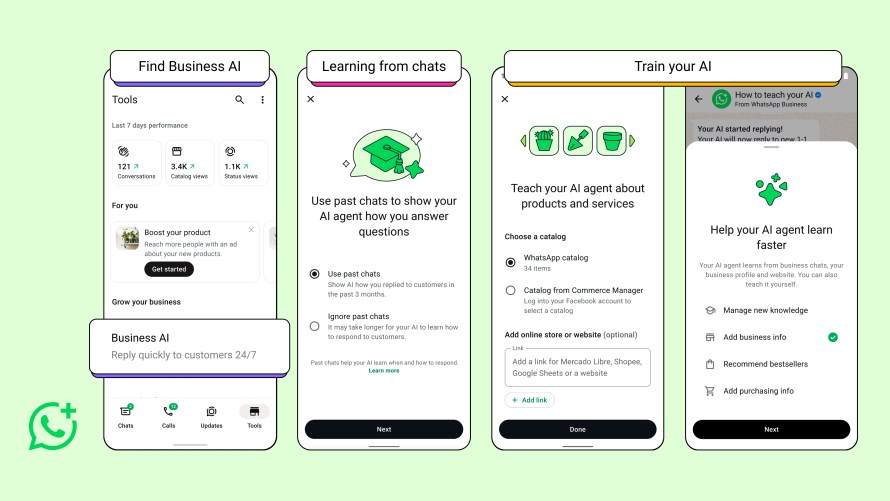
Eligible businesses using the WhatsApp Business app can begin by navigating to the Tools tab and selecting ‘Your Business AI’, where they can follow guided steps to set up the feature. Once enabled, Business AI on WhatsApp can immediately assist with customer conversations by answering questions, recommending products, sharing key business information, and helping close sales. Businesses maintain control at all times — they can step in to respond to customers directly, adjust how Business AI on WhatsApp functions, or turn the feature off entirely. For more information on setting up Business AI, visit the Help Center.