We are excited to unveil Live Chats on Threads, a feature that allows you to join public group chats during major cultural events. This innovation provides a fresh way to connect with others who share your interests, whether it’s an album release or a thrilling sports event. Live Chats build on the existing Threads platform, offering creators and fans a chance to engage in real-time conversations about what matters to them.
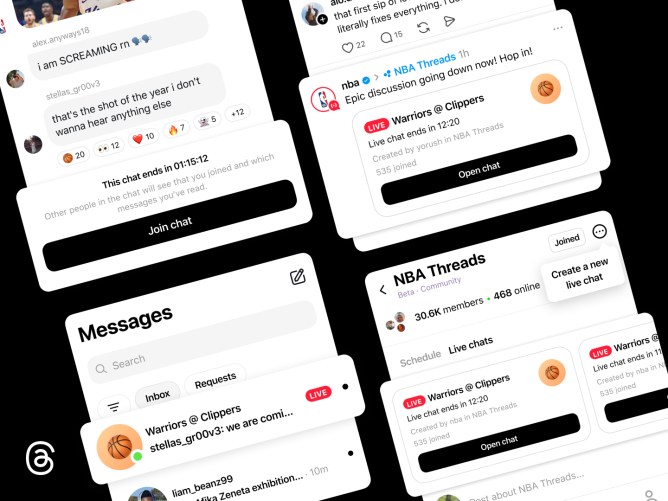
Unlike traditional group chats, Live Chats are designed for dynamic, real-time discussions centered around cultural happenings. A profile ring indicates when someone is live, and interactive features such as real-time polls, countdowns, and typing indicators keep the discussions engaging. Live scores ensure that chats remain in sync with ongoing games, preventing any lag in conversation.
The NBAThreads Community will be the first to experience Live Chats during the Playoffs, with community champions and media personalities like Malika Andrews, Rachel Nichols, Trysta Krick, David Rushing, and Lexis Mickens hosting sessions during live games.
To join a Live Chat, look for it at the top of the NBAThreads Community feed or find one linked in a shared post on your main Threads feed. Additional Community feeds will gain access to Live Chats in the coming months. A red live ring around a host’s profile photo will help you identify active chats. Once inside, you can exchange messages, share photos, videos, and links, and use reaction emojis to express yourself. Even if a chat is full, you can still follow the conversation, react to messages, and participate in polls. Live Chats remain open and publicly accessible even after they conclude.
Initially, Live Chats can be hosted by selected creators, including Community Champions who actively engage with the Threads community and initiate conversations. Eligible hosts can schedule a Live Chat by tapping the three-dot menu icon in the top right corner of their Community and selecting ‘Schedule a Live Chat.’ They can then name the chat, set a start and end time, and invite participants. Hosts can also promote their Live Chat on their Threads feed and Instagram Story.
Looking ahead, we plan to enhance the Live Chats experience with new features such as co-hosting, real-time play-by-play content, lock screen widgets for real-time activity updates, and options to quote and share chat messages on Threads. We are eager to bring people closer to significant moments, starting with the NBAThreads Community. As we gradually expand Live Chats to more communities on Threads, we aim to gather feedback and refine the experience.